Day for Night
[ Lecture Notes ] [ Lab ] [ Homework ]
This phrase refers to a variety of approaches to making daytime footage look like it occurred at night.
It’s usually done because shooting at night would be too expensive (nice lights, nice cameras, weird time of day for people) or impractical (weird time of day for people).
Shooting at night is probably preferred, though, given one’s druthers; but here’s how to try and fake it.
During production
- Some people set the camera’s color temperature (WB) to 3200K — makes artificial lights become white, and gives a blue tint to sunlit areas and objects
- Use the camera’s histogram or zebra patterns to under-expose the shot until nothing bright is clipped. If you use an ND filter to do this, the camera iris can remain wide open (like our eyes at night) yielding a dreamier, shallower depth-of-field. It might be OK to white-clip the sky if it will be replaced with stars, say.
- Add your own 5000K lights to key or fill-in important areas/objects (that are too underexposed)
In Post
- If no blue tinting was done in-camera, some can easily be added at this point
- Brightness curves
- Glow, glare, vignette
- Adding synthetic lights (and glow, reflections of lights) to windows, streetlights, car lights, etc
- Sky replacement
- Crickets
An Example Recipe
- Use the Lumetri Color effect to do a first pass:
- Drop exposure a bit
- Boost contrast a bit
- Boost shadows until desired detail is brought back from pitch black
- Drop saturation a little
- Use curves to “un-shine” or “un-glare” any host spots
- Add a slight vignette
- Use a second Lumetri effect to add some blue tinting
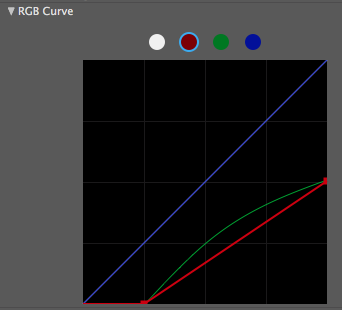
- Use curves to drop the levels of the red and green curves. Something like below:
- Experiment until the tint looks right! It can take some time.
- Use the Effect Opacity under the Compositing Options for the effect to do some fine tuning
- If foreground subjects are too dark, use the various kinds of Tracking to isolate foreground subjects from the background and add lighting with more Lumetri effect, or possibly 3D lights.
- Add synthetic lighting to streetlights, windows, car lights, store signs, etc.
- Add some vignette if possible
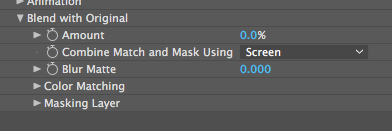
- Add some grain to simulate low ISO film/video using the Add Grain effect. Be sure to choose Screen for the blending mode within the effect controls: