Basic Expressions & Expression Controls
Links: [Lecure Outline] [Lab Exercise] [Homework]
On each frame of a comp, AE looks at the values of each layer’s properties (position, scale, rotation, etc.) to determine how to display them at that moment in time.
Also on each frame, AE checks to see if there are any expressions enabled for any properties. (For example, perhaps a layer’s scale property has an expression enabled.)
Expressions
In After Effects, an expression is a simple bit of script that is attached to some property, and which gets carried out on every frame. The result of the expression is then used instead of the original value of the property. This can be used to tie unrelated properties together (with optional math thrown in.)
Expression Script
An expression script is like a simple to-do list for AE to carry out, or “execute” at each frame.
Each item on the list is like a command for AE to do.
Commands on the to-do list are separated with semi-colons.
The last item on the to-do list is used to determine the result of the expression.
The expression result is used for the final property value.
Often times expression scripts are only 1 line long.
Enabling Expressions
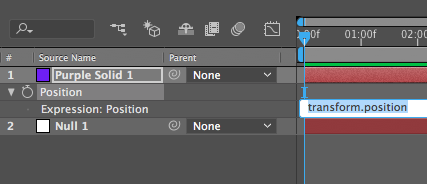
To enable expressions for a property, option-click the stopwatch icon for that property. Once enabled, a text field will be available for entering the expression script:
The text area for the expression can be enlarged to display multiple lines:
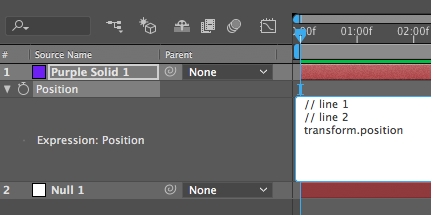
(Lines that start with two slashes are ignored by AE and used for descriptive comments.)
Writing Specific Values
Some properties have values that are simple numbers, such as rotation. You can enable expressions for the rotation property and enter a specific value like so:
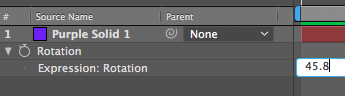
This is a script that is only one line long and whose last (and only) item is the number 45.8. So AE uses that value for the rotation property on every frame.
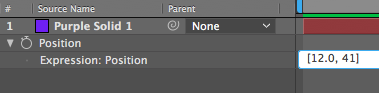
Other properties have values that are more complex than simple numbers, such as position. Position values are written using square-brackets like this:
Referring to Other Property Values
You can refer to values of other properties with their script name, which is a little bit like a backwards street address:

In other words, it’s a bit like writing “USA, Wisconsin, Milwaukee, Kenwood Blvd., 12345, Office #3”.
You can type in a property name manually, or there are some ways to have AE help save time. Pick whip. Copy with Links.
Expression Controls
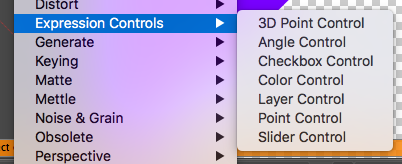
These are a special type of effect that can help add some behind-the-scenes user-interface to more complex projects. (They do nothing visually or otherwise on their own, but are often controlled or referred to with expressions.)