Basic Expressions & Expression Controls Homework Project
Links: [Lecure Outline] [Lab Exercise] [Homework]
Due next week, September 26th.
Import some audio into After Effects. You can download tons of songs from here: https://incompetech.com/music/royalty-free/music.html or just use whatever you like.
Use the “Convert Audio to Keyframes” feature to turn your audio track’s waveform into a series of keyframes.
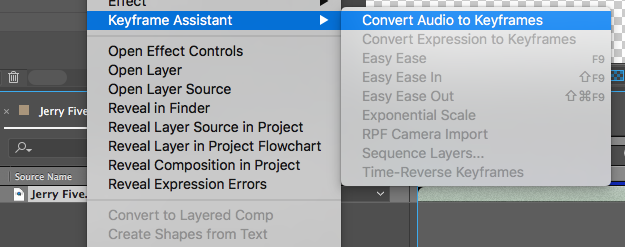
Afterwards you’ll have a new layer with lots of keyframes representing the waveform levels:

Now you can use, for example, the “Both Channels” property of the new layer to control other layer’s properties.
For this homework project, use these waveform keyframes to control various properties in a scene. For example, you could have a group of mushrooms which grow and shrink based on the waveform level. Or a light’s intensity could be tied to the levels.
Requirements
- Final video should be at least 30 seconds long
- Video should have at least a beginning and an ending (and optionally a middle if one fits)
- At least three different kinds of properties (e.g., scale, position, rotation, an effect property, etc.) being affected by the audio waveform using expressions
- Use a single expression control to control multiple properties on different layers all at once
- Animate this expression control over time
An Example Showing Waveforms Controlling The Puppet Pin Tool
Below is an example of a real-world project of mine in which I used a dialog track and expressions to control the puppet pin tool on people’s mouths to simulate a weird version of talking.