Looping Keyframes with Expressions
- loopIn and loopOut family of expressions
- Sometimes you want to loop the keyframes on a layer’s property
- Make sure you have some keyframes on your property. The loopOut and loopIn expressions don’t work without keyframes to loop!
- Turn on expressions for the keyframed property by Option/Alt-clicking the stopwatch. Now you should see something like:

At the bottom-right of the image above is a little black triangle button inside a light gray circle. Click that, it’s a shortcut menu for accessing commonly used expression snippets. It looks like this:
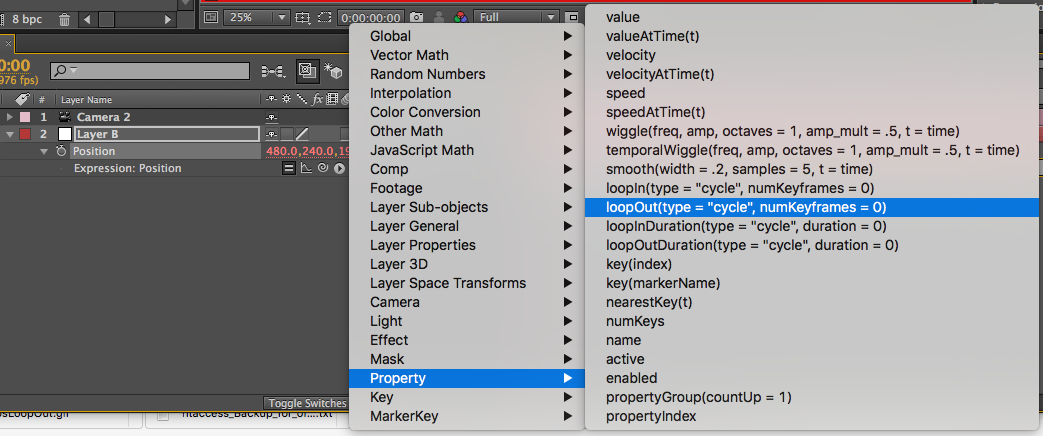
- Choose loopOut(type=”cycle”, numKeyframes=0)
- It should now show up in the expression text area:

- The word cycle means the loop should start over at the beginning when it gets to the end of the loop. It can be replaced with certain other words. Replace it with the word pingPong so that the loop plays back-and-forth:
loopOut(type=”pingPong”, numKeyframes=0) - The value for numKeyframes is used to indicate how many keyframes should be included in the loop, and is a little weird. The value 0 (zero) is special. 0 means “include all of this property’s keyframes in the loop.” But a value of 1 or more means “include the last keyframe plus this many additional keyframes.“ So a value of 1 means loop the last “two keyframes.”

- The stuff inside the parentheses are called parameters. Some parameters have default values for when you don’t type them out. For example, the default value of loopOut‘s type parameter is “cycle” and the default value for the numKeyframes parameter is 0. So if you just type this in an expression area:
loopOut()
..it’s the same as typing this:
loopOut(type="cycle", numKeyframes=0)
- loopIn is very similar to loopOut, but used for looping keyframes earlier in time as opposed to later in time.
loopIn(type="pingPong")